
How to Track Competitor Pricing Changes Using LinkedIn and Public Data
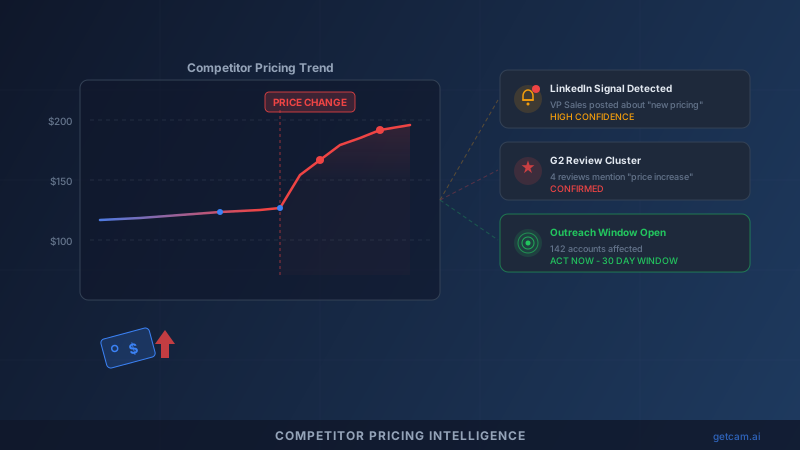
How to Track Competitor Pricing Changes Using LinkedIn and Public Data
When a competitor raises prices, something specific happens: their customers start shopping. Not all of them. But enough of them to move your pipeline if you know it happened and act fast.
The problem is that most pricing changes are not announced. There is no press release. No blog post. Competitors change pricing quietly, behind login walls, on sales calls. By the time your sales team hears about it from a prospect six weeks later, the window has closed.
But pricing changes always leak. Every single time. They leak through LinkedIn posts from frustrated customers, through job postings for pricing analysts, through G2 reviews that suddenly mention cost, and through patterns in public hiring data.
Here is how to build a system that catches those signals in real time and converts them into pipeline.
Why Pricing Changes Are the Highest-Value Competitive Signal
Not all competitive intelligence is equal. A competitor redesigning their website is low signal. A competitor hiring a new CMO is medium signal. A competitor raising prices is the highest-signal event you can track.
Three reasons:
Pricing changes create immediate buyer motivation. When a prospect’s current vendor raises prices, the switching cost calculation changes overnight. Yesterday, switching was expensive relative to staying. Today, staying just got more expensive. That math shift creates a 30-60 day window where prospects actively evaluate alternatives.
Pricing changes are predictable in their effects. Unlike product launches or leadership changes, price increases produce a reliable pattern: customer complaints spike within 2 weeks, review sites reflect frustration within 4 weeks, and active vendor evaluation begins within 6 weeks. If you know the timeline, you can time your outreach precisely.
Pricing changes affect the entire customer base simultaneously. A product bug affects some users. A feature gap affects a segment. But a price increase hits every customer on the new plan at renewal. That means the addressable opportunity from one pricing event can be 10-50x larger than other competitive signals.
Where Competitor Pricing Signals Leak Publicly
You do not need insider information. Pricing changes produce detectable signals across five public channels.
1. LinkedIn Posts from Sales Reps and Customer Success
When a vendor raises prices, their front-line teams feel it first. Sales reps suddenly have to justify higher pricing in calls. Customer success managers handle angry renewal conversations.
Watch for these patterns:
- Sales reps posting about “selling on value, not price” (this language spikes after price increases)
- CS managers sharing tips on “handling difficult renewal conversations”
- Account executives mentioning “new packaging” or “updated plans” in posts
- Employees liking or commenting on content about “pricing strategy” or “value-based pricing”
These are not hypothetical signals. They happen within 1-2 weeks of every significant pricing change.
2. Job Postings for Pricing and Packaging Roles
Companies do not hire pricing analysts randomly. A sudden job posting for “Director of Pricing Strategy” or “Pricing and Packaging Manager” signals that pricing changes are either in progress or imminent.
Track competitor careers pages for:
- Pricing analyst or pricing strategy roles
- Revenue operations roles with “packaging” in the description
- Finance roles focused on “unit economics” or “monetization”
When these postings appear, a pricing change is typically 60-90 days away.
3. G2, Capterra, and TrustRadius Reviews
Review sites are the canary in the coal mine. When a competitor changes pricing, the “Value for Money” or “Pricing” scores on review sites shift measurably.
Look for:
- A sudden cluster of reviews mentioning “expensive,” “price increase,” or “not worth the cost”
- A drop in the pricing/value rating over a 4-week window
- Reviews that explicitly mention “they just raised prices” or “renewal was a shock”
This is often the most concrete public evidence that a pricing change has occurred.
4. Customer Complaint Patterns on Social Media and Forums
Beyond LinkedIn, check Reddit, Twitter/X, and industry-specific communities. Competitor customers vent in these channels first. A Reddit thread titled “Did [Competitor] just double their prices?” is a gift. It tells you exactly when, approximately how much, and which customer segments are affected.
5. Competitor Pricing Page Changes
Some competitors publish pricing publicly. Use web monitoring tools to track changes to their /pricing page. Even if they do not publish exact numbers, changes to plan names, feature bundling, or the addition of an “Enterprise: Contact Sales” tier signal pricing restructuring.
Building a Monitoring System for Competitor Pricing Signals
Manual monitoring does not scale. You need a system that runs continuously and alerts you when signals cluster.
Step 1: Define Your Competitor Watch List
Start with your top 5 direct competitors. For each one, identify:
- Their LinkedIn company page and key employee profiles (VP Sales, VP CS, Head of Pricing)
- Their careers page URL
- Their G2/Capterra profile URLs
- Their pricing page URL
- Relevant subreddits and community forums where their customers congregate
Step 2: Set Up Signal Monitoring
For each competitor, create monitoring for:
LinkedIn activity monitoring. Track posts from key employees using keyword filters: “pricing,” “packaging,” “renewal,” “value,” “plans,” “tier.” Track job postings weekly. Track employee sentiment (are CS managers suddenly posting about churn reduction?).
Review site monitoring. Set up weekly checks on G2 and Capterra. Track the pricing/value score trend. Flag any review that mentions pricing changes explicitly.
Web monitoring. Monitor their pricing page for any HTML changes. Monitor their blog and changelog for pricing-related announcements.
Community monitoring. Set up keyword alerts in relevant subreddits and forums for “[Competitor name] + pricing” or “[Competitor name] + expensive.”
Step 3: Create a Signal Scoring System
Not every mention of “pricing” means a pricing change occurred. Score signals by confidence:
- High confidence (act immediately): Multiple G2 reviews mentioning price increase in same week. Explicit LinkedIn posts from competitor employees about “new pricing.” Reddit threads confirming specific price changes.
- Medium confidence (investigate further): Job postings for pricing roles. Pricing page HTML changes. Uptick in “value vs. price” content from competitor employees.
- Low confidence (add to watch list): Single review mentioning cost. One employee posting about pricing strategy. Careers page adding a finance role.
When you see 2+ medium-confidence signals or 1 high-confidence signal, treat it as confirmed and activate your outreach playbook.
Step 4: Automate With GetCAM
This is where GetCAM replaces your spreadsheets and manual checks. GetCAM monitors competitor LinkedIn activity, job postings, and public signals continuously. When pricing-related signals cluster, it sends real-time alerts to your sales team with the signal source, confidence level, and affected competitor.
Instead of checking 5 competitor careers pages every Monday and scanning G2 reviews manually, GetCAM runs this monitoring 24/7 and delivers actionable alerts the moment signals appear.
What to Do When You Detect a Competitor Price Increase
Detection is half the battle. Execution is the other half. Here is the playbook.
Week 1: Validate and Prepare (Days 1-7)
Confirm the signal through multiple sources. If G2 reviews mention a price increase, cross-reference with LinkedIn activity from competitor employees. Prepare your outreach messaging. The key angle is not “we’re cheaper.” The angle is: “Your vendor just changed the deal. You should understand your options before your renewal.”
Week 2-3: Launch Targeted Outreach (Days 8-21)
This is the highest-conversion window. Competitor customers are frustrated but have not started evaluating alternatives yet. You want to be the first conversation they have.
Build your prospect list from the competitor’s known customer base. Validate every email address through Scrubby before sending — bounce rates kill deliverability, and you cannot afford to waste this window on bad data.
Outreach should be direct: “I noticed [Competitor] recently updated their pricing structure. Many teams in [industry] are re-evaluating their options. We’ve helped [X] companies in similar situations reduce costs by [Y]% while maintaining [key capability]. Worth a 15-minute conversation?”
Use Kali to streamline meeting scheduling so prospects can book time instantly without back-and-forth emails.
Week 4-6: Follow-Up and Expand (Days 22-42)
The initial wave of frustration settles into evaluation mode. Prospects who did not respond initially may now be in active buying cycles. Run a second outreach sequence focused on proof points: case studies, ROI calculators, competitive comparison sheets.
For teams running multi-channel GTM motions, Vendisys can orchestrate these follow-up sequences across email, LinkedIn, and other channels automatically.
Week 7+: Long-Tail Capture
Some prospects will not switch immediately but will remember you when their renewal comes up. Add non-responders to a nurture track. The competitor price increase is a 6-12 month tailwind, not just a 6-week event.
Automating the Full Pipeline: From Signal to Closed Deal
The complete system looks like this:
- GetCAM detects a cluster of pricing signals for Competitor X (LinkedIn activity + G2 reviews + job postings).
- Alert fires to your sales team with signal details, confidence score, and recommended action.
- Prospect list is built from Competitor X’s known customer base.
- Emails are validated through Scrubby to ensure deliverability.
- Outreach launches within 7 days of signal detection, timed to the highest-conversion window.
- Meetings are booked through Kali with zero friction.
- Follow-up sequences run automatically through Vendisys.
Every step from detection to outreach is automated. The only manual step is the sales conversation itself.
The Cost of Missing Pricing Signals
Teams that do not track competitor pricing changes systematically miss 2-4 pricing events per competitor per year. For a sales team tracking 5 competitors, that is 10-20 missed windows annually. Each window represents access to a frustrated customer base actively reconsidering their vendor.
Conservative math: if each pricing event makes 5% of a competitor’s customer base evaluable, and your win rate on switchers is 20%, a single missed event costs you multiple deals. Over a year, the compounding effect is significant.
The teams running this playbook are not working harder. They are working on better timing. A cold email sent during a pricing disruption converts at 3-5x the rate of the same email sent at random.
Start tracking pricing signals today. Set up GetCAM to automate the monitoring, and build the outreach infrastructure to act within days, not weeks, when the next competitor pricing change drops.
Ready to see competitor activity?
See which accounts your competitors are targeting on LinkedIn before you cold-call them.
Book a Walkthrough